Hover
Hover to expand button
Hover to expand the button, and animate the childs of button, hover out to reverse the animation.
Mouse hoverChild elementsReverse on out
100usersdiscount25 of 100 claimed Riveand everyHTMLelement on your page
Bring Spline 3D scenes and Rive animations to life, and now animate buttons, menus, cards and text too. Hover, click, scroll and page-load animations, built visually with no coding required.
Use the same visual builder on buttons, menus, cards, images and text. No Spline scene needed.
Drop in any Spline scene and animate its layers on hover, click, mouse move, scroll or page load.
Upload a .riv file, pick the artboard and state machine, and drive its inputs from your visitors' actions.
Pick what you want to animate, set the triggers, and watch it play right inside the editor.
Headings, buttons, cards, images, whole sections. If it is on your page, you can animate it, with no code.
Drop in a scene, then trigger its states from hover, click, mouse move or scroll.
Add a .riv file and drive its inputs and state machines from the page.
Every demo below is a regular HTML element with an animation from the plugin's builder. Hover, tap and click them.
Hover to expand the button, and animate the childs of button, hover out to reverse the animation.
Move your mouse over the eyes to see the mouse movement animation.
A circular reveal with staggered links. A second click plays it in reverse.
Every animation step accepts any GSAP property, and values can be functions that run each time the step plays. Measure elements, follow the cursor, morph one shape between targets. This grid is one plugin animation: each tile picks a random color when you hover it.
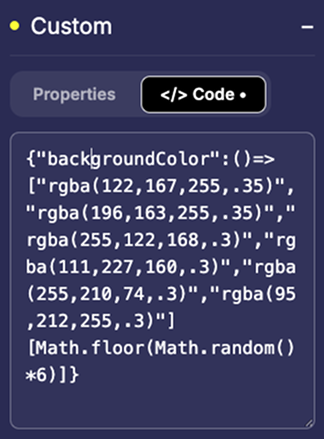
Hover over tiles to see the animation
Real Spline scenes driven by the same triggers.
Rive state machines driven from hover, click and scroll.
Learn the builder once and use it on Spline scenes, Rive state machines and regular page elements.
Play on hover, then reverse or run a separate hover-out animation.
3D · Rive · HTMLRun one animation on the first click and another, or the reverse, on the second.
3D · Rive · HTMLFollow the cursor across an element or the whole page.
3D · Rive · HTMLAnimate when the page starts or finishes loading.
3D · Rive · HTMLPlay once as an element enters the viewport.
HTMLScrub the animation with the scrollbar.
3D · Rive · HTMLSpline 3D, Rive and HTML animations are in every plan.
Pay once. Use code 100usersdiscount at checkout.
Have questions?
We have answers.
It lets you bring your WordPress site to life with scroll, click, hover and page load animations. Animate interactive Spline 3D models and Rive animations, or animate any HTML element on your page, using a visual builder with no coding required. 🚀
HTML animations work on any WordPress theme and any page builder, because they only need a class, id or selector.
Spline 3D and Rive have native modules for Bricks, Elementor and Divi 5, plus a shortcode you can use in any other builder. Rive also has a native block for the WordPress block editor.
Trigger animations from scrolling (the whole page or a section), Click, Mouse Hover In/Out, Page Load and Mouse Move over Elements. You can use these triggers with Spline 3D models, Rive animations and your own HTML elements. HTML animations also have Scroll into View. Check out our demos to see the possibilities in action!
Spline and Rive variables are available inside the plugin, so you can connect interactions to them.
Any element you can target with a class, id or selector: buttons, menus, cards, images, headings and text. Move, scale, rotate, fade or change colors, and use any GSAP property if you want more control.
No. You build animations in the visual builder and preview them live. Developers who want more can add custom values, including functions that run each time a step plays.
Our documentation page covers installing the plugin, creating your first animation, triggers, HTML animations and the templates. If you can’t find what you need, email [email protected].
No. HTML animations work on any element on your page, with or without a Spline scene or Rive file.
Yes. Every plan includes Spline 3D, Rive and HTML animations.
Yes. You’ll need a free Rive account to create and manage your animations, and a paid account to export the .riv file.
You can create an account here: https://rive.app/
You can learn about Rive on their YouTube channel.
Yes. The plugin includes a setting that lets you enable support for uploading .riv files directly into the WordPress media library.
Just turn on the “Enable Rive (.riv) File Upload” option in the plugin settings, and you’ll be able to upload your Rive files like any other media.
Yes! The plugin exposes all Rive objects you’ve added on your page. You can use them in your custom code to animate however you like.
All Rive instances are accessible via window.riveInstances.
Spline animation for wordpress is a paid plugin, you can get it for your website from this Link
Yes there are different plans available for this case, you can get per year 5 sites license or can get unlimited sites license from this Link
Once your subscription has expired you can renew it at a discounted rate. If you decide not to renew, the plugin will keep working, but you won’t get new updates or email support.
Please send an email to [email protected] with your question or issue along with your license, and I’ll respond as fast as I can, most often within 1-2 days.
No, Spline (spline.design) is a separate platform. This plugin is designed to integrate Spline 3D models into your WordPress site and give you control from within WordPress. You’ll need a free or paid Spline account to create and access your 3D models.
No. Once your Spline model is ready and fully tested, you can cancel your Spline subscription and continue using the model through the plugin without any issues. The Spline logo/watermark will not return for already exported Code Export files used by the plugin, unless you re-export the scene from Spline.
If during the next 14 days you experience an issue that makes the product unusable and we are unable to resolve it, we’ll happily consider offering a full refund of your money.